Desktop Explorer starts giving you puzzles almost as soon as the game begins. Some require simple passwords, while others ask you to inspect files, use programs, or interact with objects outside the puzzle window. A few puzzles also expect you to notice small details that you can miss on your first playthrough.
I played through every major section and collected all the Desktop Explorer passwords, codes, and puzzle solutions in this guide. The walkthrough below follows the same order as the game, so you can quickly jump to the puzzle you’re currently stuck on.
Warning: This article contains major puzzle spoilers.
Desktop Explorer Walkthrough: All Puzzle Solutions, Passwords & Achievements
OpenMe Password
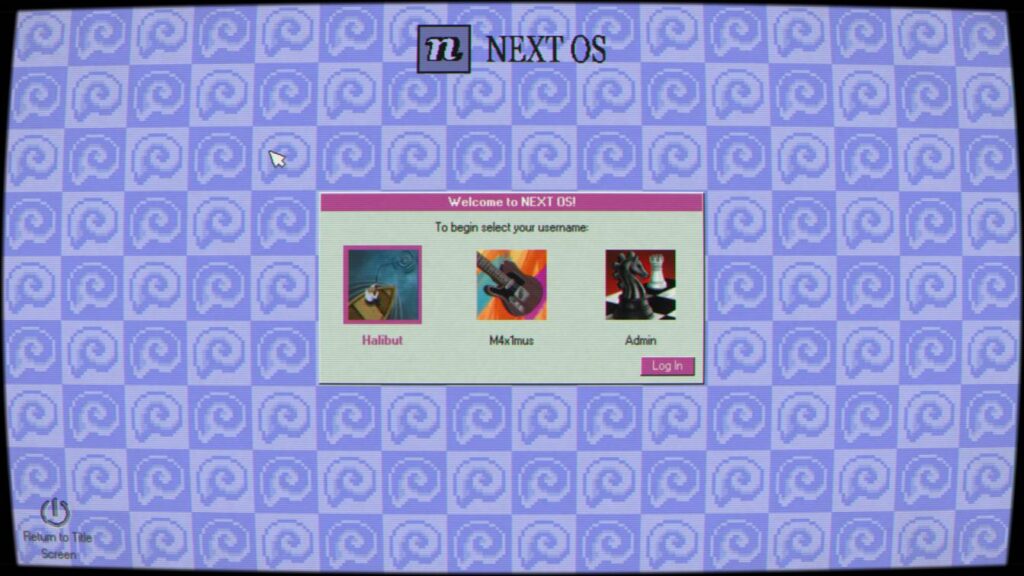
When you first launch the game, you’ll notice a program named OpenMe on the desktop. You have to open it to start the real adventure.
I tried opening it right away, and it immediately asked for a password.
OpenMe Password: guppy
After entering the password, Desktop Explorer installs on your computer.
A bot named Pizarro then appears on your screen. It introduces the Desktop Explorer system, explains the basic navigation, and teaches you how the game’s puzzle mechanics work. Don’t skip these messages because they explain several controls that become important later.
The Cave Puzzle Solutions
The Cave is the first major puzzle chain in Desktop Explorer. Most puzzles ask for a word or phrase, but a few require you to act instead of typing an answer.
Puzzle 0 – Prologue: fortuna
Puzzle 1 – Go In: Inanna
Puzzle 2 – Ancient Ruins: ELEPHAS
Puzzle 3 – Narrow Tunnel: SALVE
Puzzle 4 – Crossroads: PORTONUS
Puzzle 5 – Big Door: MMTT
Puzzle 6 – Lights Out: Kassandra
Puzzle 7 – Dark Sanctum: RUBICON
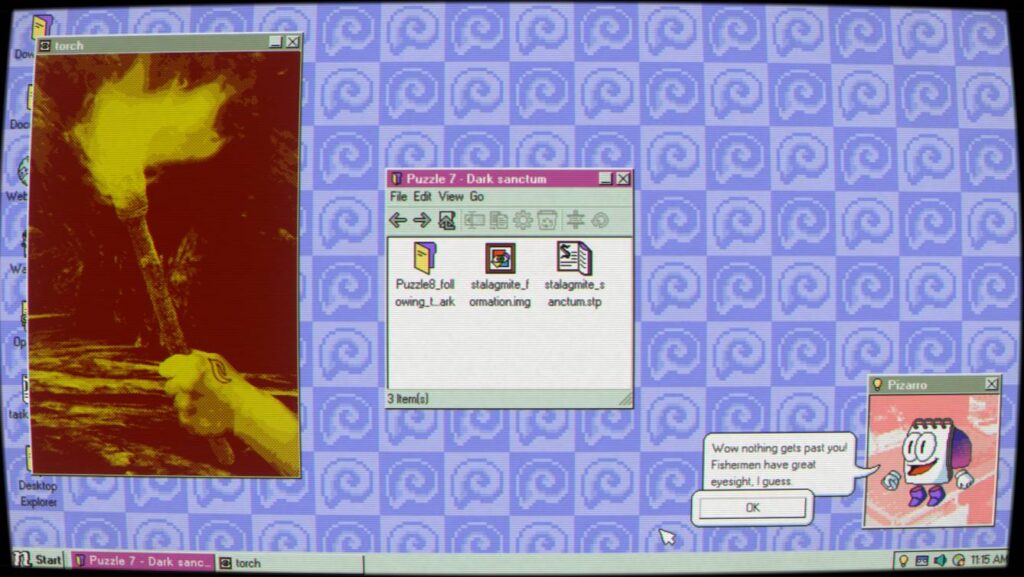
Puzzle 8 – Following the Dark: RUBICON
Puzzle 9 – Altar: This puzzle doesn’t require a password.
Instead, stack the stones on the altar to continue. The game only checks the physical interaction, so typing words won’t solve this puzzle.
Puzzle 10 – Beyond: This has a few different steps, so don’t enter the final answer right away.
First, collect the three stones. You’ll find them during Puzzle 6 and Puzzle 8.
After collecting all three stones, stack the images on top of each other.
Next, use the lens on the mural in the room. Each color reveals a different password. Enter them in the order below.
crocodile > 14 > fire > Walleye
Missable Achievement – This Is Not Your Computer
Instead of entering Walleye, type father as the final answer to unlock the This Is Not Your Computer achievement. If you enter Walleye first, you’ll miss this achievement during that playthrough.
Once you finish these four steps, you’ll clear The Cave and unlock the next major area of the game.
The Temple Puzzle Solutions
The Temple opens after finishing The Cave. This area splits into three different paths, and each one focuses on a different character. Some puzzles only need a password, while others ask you to rename files, inspect objects, or use tools inside the game.
Follow the sections below in the same order.
Temple Path 1 (Shai → Anubis)
The Temple starts with Shai. Continue until you reach the Anubis path.
Anubis Puzzle Answer: Ammit
Words From Beyond 1: Instead of entering a password, rename the ABRACADABRA to: INANNA
Save the change to continue.
Words From Beyond 2: SEKHETAARU
Yellow Lockbox
This puzzle is easier than it first looks.
Instead of searching for another code, open the trash bin. The clue you need is there, and checking it completes this part of the puzzle.
Temple Path 2 (Thoth)
Select the Thoth path when it becomes available.
Thoth Password: 5267
Hourglass Puzzle: 67
After solving the Hourglass puzzle, choose Go to the Future to move forward.
Temple Path 3 (Ra)
The Ra path contains several different puzzle types, so make sure to complete each step in order.
Ra Puzzle: Sahmat
Tomb Site – Rename the Magic Word
Open source code and write “WE ARE INCOMPLETE WITHOUT YOU” in the space provided at the bottom. Next, speak with Pizarro.
Make sure you enter the entire sentence exactly as shown.
Click the light bulb icon to request a hint.
When the game asks a question, answer: NO
Tomb Site – Mistake File
This puzzle has two actions.
- Compress the Mistake file.
- Open the compressed file again.
After reopening it, continue to the final answer.
Tomb Site Answer: MERNEITH.
Entering this password will complete the Tomb Site puzzle, and you’ll finish the Temple section.
M4x1mus Password Recovery Answers
Before entering the M4x1mus puzzles, you’ll need to recover the account password by answering a few security questions.
Use the answers below.
| Security Question | Answer |
|---|---|
| Dinosaur | stegosaurus |
| Future School | cascadia |
| Middle Name | Faiza |
After answering all three correctly, you’ll gain access to the M4x1mus section.
M4x1mus Puzzle Solutions
The M4x1mus section is one of the biggest parts of Desktop Explorer. It mixes passwords, navigation puzzles, file management, and several mini-games. A few puzzles also expect you to pay attention to small details on your desktop instead of giving direct clues.
Follow the solutions below in order.
When you reach the Do Not Open file, enter the following password: POWER
Wait, Do Not Move
This puzzle doesn’t need a code.
Replace the screen protector with the maze image. After swapping it, the puzzle will continue automatically.
NextRooms Login
Use these login details to access the NextRooms account.
| Login | Value |
|---|---|
| Username | The_Max |
| Password | sweaters123 |
Compass Puzzle
This puzzle can be confusing because the direction changes with the compass.
Look at the clock in the bottom-right corner of the screen. Use the red arrow as north, then enter the directions in the following order.
North → West → South → East → South → WestThe input follows the same style as a Konami Code, so make sure you enter every direction in the correct sequence.
Room Codes
You’ll receive two room codes during this section.
- RC-CLR7V40
- RC-L1Z4RD5
K4M4R3N4 Quiz Answers
Answer every quiz question with the options below.
| Question | Correct Answer |
|---|---|
| Dream in Gouache | The Sweaters |
| Slasher Fest | Zombie |
| Rod & Reel | Red |
| Linkearlier’s After Trilogy | Pineapple Summer |
Magic Hat Puzzle: CRONOS
Aquarium Puzzle: 3142
Compass Puzzle 2
The second compass puzzle works exactly like the first one.
Use the clock in the bottom-right corner, line up the directions using the red arrow as north, then enter this sequence.
North → South → East → North → East → SouthWormhole Puzzle
This puzzle has several steps.
First, collect all of the painting codes.
Next, save:
- The television image.
- The painting that contains the shapes.
You’ll need both later in the puzzle.
Color Codes
Use these values during the painting puzzle.
| Color | Value |
|---|---|
| Purple | 0 |
| Red | 2 |
| Blue | -2 |
| Green | 3 |
| Yellow | 1 |
Number Layout
Arrange the numbers like this.
| 8 | 1 | 6 |
| 3 | 5 | 7 |
| 4 | 9 | 2 |
Painting Order
After collecting every clue, enter the paintings in this order.
- 896
- 712
- 354
Note: During this puzzle, you’ll come across several different 8-ball images. The correct clue comes from the painting’s 8-ball, not the key, advertisement, or image file. This small detail has confused a lot of players.
Paint Puzzle
After entering the correct painting order, complete the Paint Puzzle using the clues collected from the Wormhole section.
Col Locker Password: 0321
Ticket Puzzle
This puzzle is different from the others because it requires several actions instead of entering a password.
Complete it in this order:
- Finish a game until you receive a ticket.
- Create copies of the ticket.
- Compress the copied tickets into ZIP files.
- Copy the ZIP files again.
Keep repeating the required steps until the puzzle accepts your result.
Vending Machine
Insert exactly: $3.75
Nonogram Puzzle
Solve the Nonogram completely to continue.
There isn’t a password for this section.
Dress-Up Puzzle
Dress the mannequin so it matches the person shown in the picture hanging on the wall.
The outfit has to match the reference image before the puzzle will accept it.
Dress-Up Puzzle 2
For the second outfit, equip the mannequin with:
- Green Tie
- Blue Shirt
- Glasses
This completes the final Dress-Up puzzle in the M4x1mus section.
Admin Puzzle Solutions
The Admin section lets you tackle puzzles in almost any order. Some puzzles use passwords, while others ask you to restore files, solve ciphers, or interact with objects inside the environment.
Use the solutions below whenever you get stuck.
Restore Broken Files
Restore the damaged files with these commands.
Command 1: chrono restore
Command 2: shame/—.res
de_analysis Password: goldenratio
de_analysis Admin Password: TAROCCHI
Mail Puzzle 1
Decode the message below.
YC WC IX XC UT – YV CO RM LU RO DE TF YO WX MOMail Puzzle 1 Answer
TEGETICULA – THIRD AND FINAL WARNINGMail Puzzle 2
Use the following encoded message.
QS UM WO DW RG A – MY NZ IO KO QR AK OE GD DC WM SF AO VR MSMail Puzzle 2 Answer
GOLDEN RATIO – OATH OF SILENCE AND CONSEQUENCESPortrait on the Wall
This puzzle doesn’t use a password.
Complete these actions in order.
- Cover the light with your hand.
- Type: feel wall
- Pull the hidden lever.
The secret mechanism unlocks after you perform all three steps.
Orb Puzzle
Interact with the orb in this exact order.
- Select USE.
- Place the Eye in the center.
- Put one hand on the left side.
- Put the other hand on the right side.
The orb activates once everything is positioned correctly.
Guppy Puzzle Solutions
Guppy is the final major puzzle chain in Desktop Explorer. Most puzzles here combine information you’ve learned earlier in the game.
Desktop Explorer Password: THESEUS
Magic Word for the Painting
Rename the Magic Word to: inanna
Halibut Puzzle
Follow this movement pattern.
Left → Right → Left → Down → Left → Right → Down“is slowly”
Enter:
bigCatch“fading”
Enter:
dontForget“away”
Enter:
anglerTrioChess Puzzle Solution
Arrange every piece exactly like this.
| Chess Piece | Position |
|---|---|
| King | B1 |
| Knight | B2 |
| Rook | C1 |
| Knight | C2 |
| Rook | A3 |
| Pawn | A2 |
After placing every piece correctly, the puzzle will clear.
Desktop Explorer Achievements
Desktop Explorer includes several story achievements, optional collectibles, and a few hidden achievements that you can easily miss. Some unlock automatically, while others require very specific actions.
Story Achievements
You’ll unlock these simply by progressing through the main story.
- Fortuna
- Merneith
- What a Thrill
- Sol Plaza
- The Tower
- Desktop Detective
- Desktop Explorer
No extra requirements are needed for these.
I Like Your Style!
Change your desktop wallpaper once.
Taking Notes
Create a new .npg file and save it.
Screen Time
Watch the game’s screensavers for a total of 10 minutes.
You don’t have to do this in one sitting.
Masterpiece
Create a file in Sketchy and save it.
Lore Master
Read every accessible Chronolog entry.
Don’t worry if you’re missing some Admin-related entries. Not every Chronolog can be collected during a single part of the game.
This Is Not Your Computer
During Puzzle 10, enter: father as the final answer.
Muralist
Contribute to the mural on Floor F2.
Sold Out
Collect every reward available in CabiNet.
Can I Pet Her?
Pet the dog in Minesniffer.
Neat Freak
Completely clean the glass of one terrarium.
I Am the Law (Missable)
Dress the mannequin with:
- Guard/Security Hat
- Purple Shirt
- Blue Tie
Important: This achievement is missable. Complete it before finishing the final mannequin dress-up puzzle. After solving that puzzle, you can no longer change the mannequin’s outfit.
Clever Girl
Open the nOS Terminal and type:
Uninstall DesktopExplorerMany players thought this achievement could be missed, but you can still earn it by loading your save and returning to the Admin section, as long as you still have access to the nOS console.
Power to the People
Create several white pawns.
Kojami Code
Enter the Kojami Code from the main menu.
You can unlock this achievement at any time as long as you know the code.
Example Quest
Open the Halibut profile, then go to the Desktop Explorer folder.
Enable Hidden Files, open the hidden file inside the first folder, and enter the password that Pizarro gave you when you first installed Desktop Explorer.
This hidden file is easy to overlook, so many players miss the achievement on their first run.
WebSurfer
Open every website in the game.
Don’t stop at the main pages. You also need to:
- Visit every available subpage.
- Open every Chronolog link.
- Check every linked page inside those entries.
Once you’ve visited every accessible page, the achievement will unlock. Community reports also confirm that collecting all available Chronolog links makes this achievement much easier to complete.