
Car Park Capital lets you build custom structures in the Scenario Editor, but you can also use those blueprints in your regular city. You just need to copy the saved .cpbp files into the game’s existing blueprint folders.
You can use this method to place your own parking garages, office buildings, parks, and other structures multiple times. You don’t need any mods or extra programs.
How to Create Custom Blueprints in Car Park Capital
First, open the Scenario Editor and build the structure you want to use in your normal game.
- Start Car Park Capital and click New Game.
- Select Custom Scenarios (or the custom scenario option shown in your game).
- Choose Create Your Own Scenario.
- Select Start Scenario Editor and enter a name for your scenario.
- Build your desired structure using the available tools.
Once your building is ready, save it as a blueprint.
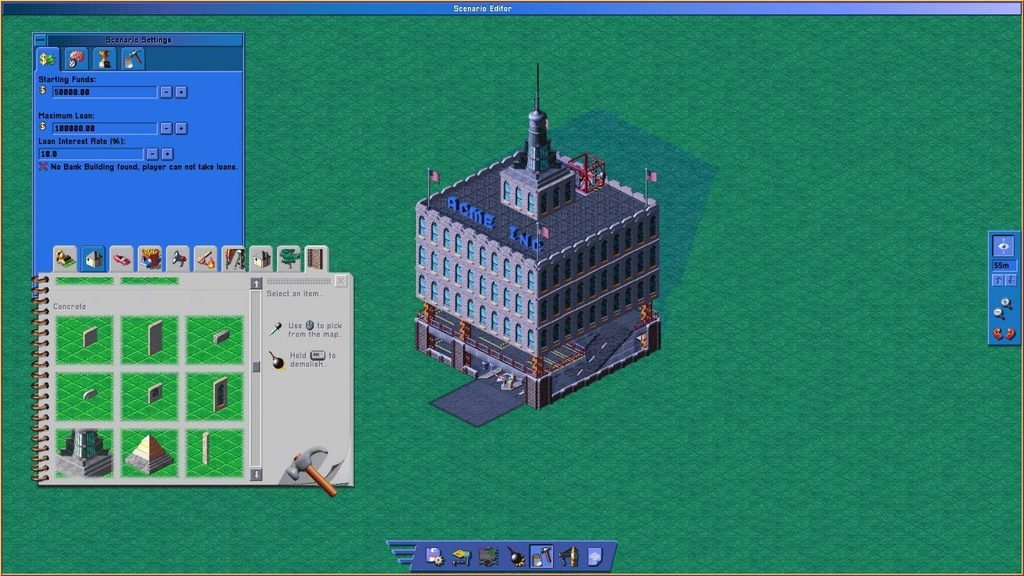
Save Your Building as a Blueprint
- Open Building Plans.
- Select Create.
- Choose the area containing your structure.
- Enter a filename and save the blueprint.
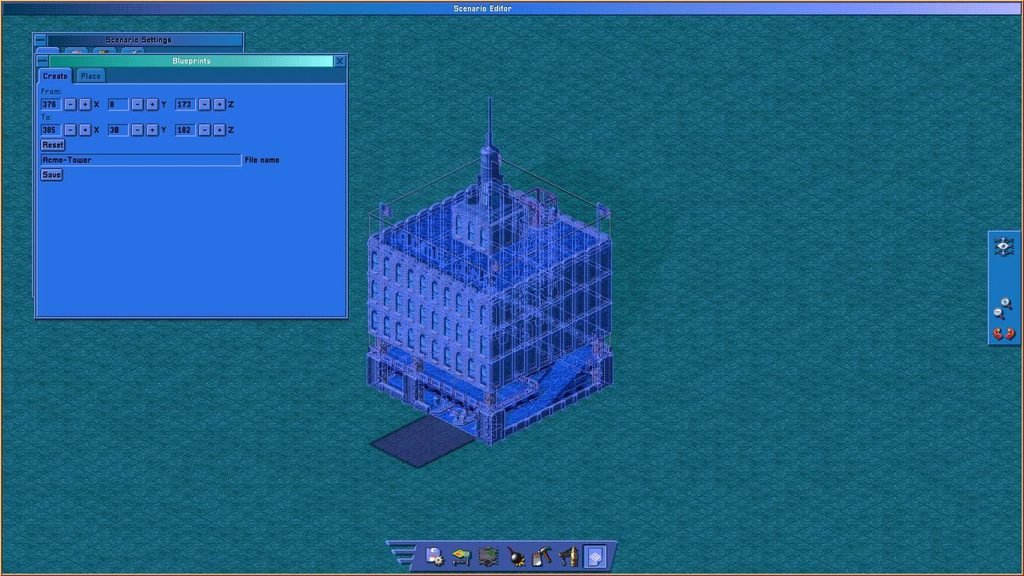
You can repeat these steps to save different buildings, parking garages, parks, or entire building complexes. Give each blueprint a distinct name so you can identify it later.
Remember to save your scenario separately. Saving a blueprint only saves the selected structure, while saving the scenario preserves your editor setup so you can return to it later.
Select Save or Save and Go to Menu in the Scenario Editor to save your scenario.
Reopen a Saved Scenario
You don’t have to create a new scenario whenever you want to make another blueprint.
- Click New Game.
- Open Custom Scenarios.
- Select your saved scenario.
- Choose Open in Scenario Editor.
You can now build additional structures and save them as separate blueprints.
Find Your Saved Blueprint Files
After saving a blueprint, locate its file in the Car Park Capital installation folder.
The quickest way to open this folder is through Steam:
- Open your Steam Library.
- Right-click Car Park Capital.
- Select Manage → Browse Local Files.
Inside the installation folder, open:
Car Park Capital\saves\blueprints
Your custom blueprints are stored here as .cpbp files. For example, a blueprint named MyBuilding will have a filename like MyBuilding.cpbp.
Keep these original files safe. You’ll need to copy them into another folder to make them available in your regular game.
Add Custom Blueprints to the Normal Game
This is the important part. Car Park Capital stores its regular-game blueprints in a different folder from the custom blueprints you create in the Scenario Editor.
Open the following folder inside your game installation directory:
Car Park Capital\assets\blueprints
You’ll find several folders inside it:
small_parking_garages— For small parking garages.medium_parking_garages— For medium-sized parking garages.large_parking_garages— For large parking garages.scenario_editor— For Scenario Editor blueprints.
Copy Your Blueprint into an Existing Folder
- Return to
Car Park Capital\saves\blueprints. - Find the
.cpbpfile you want to use. - Copy the file into one of the three parking garage folders under
assets\blueprints. - Choose the folder based on the size or category you want to use for the blueprint.
For example, you could copy your file to:
Car Park Capital\assets\blueprints\large_parking_garages\MyBuilding.cpbp
You can use any of the three existing parking garage folders. Organizing your blueprints by size can make them easier to find when your collection grows.
Copy the file instead of moving it. This keeps the original blueprint in your saves folder, so you can reuse it or restore it if something goes wrong.
Place Custom Blueprints in Your City
Once you’ve copied the files, launch Car Park Capital again. The game needs to load the files from their new location.
- Load your regular city save.
- Open Blueprints → Place.
- Select the category where you copied your blueprint.
- Find your custom structure in the list.
- Select it and place it wherever you want in your city.
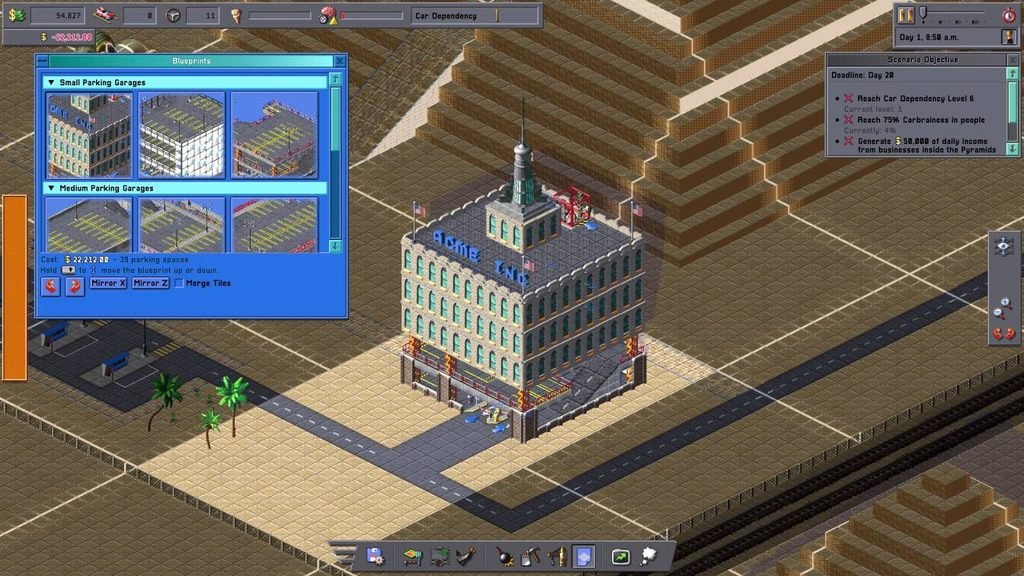
Your custom blueprint should now be available alongside the game’s existing options. You can place the same structure multiple times without rebuilding it in the Scenario Editor.
Important Things to Know About Custom Blueprints
Can You Create Your Own Blueprint Categories?
The method described here does not support custom categories through additional folders. Creating a new subfolder inside assets\blueprints did not make it appear as a new category.
Use one of the three existing parking garage folders instead.
Do You Need to Create a New Scenario Every Time?
No. Open your saved scenario through Custom Scenarios and return to the Scenario Editor. You can create and save more blueprints without starting over.
Will Game Updates Delete Custom Blueprints?
They might. Your custom files are stored inside the game’s assets directory, so a game update or Steam’s file verification process could remove or overwrite them.
Keep backup copies of your .cpbp files somewhere outside the Car Park Capital installation folder. If an update removes them, you can copy them back into the appropriate folders.
Can You Use Buildings or Components You Haven’t Unlocked?
This method may let you place structures and components that aren’t normally available at your current progression level.
For example, you could create a plastic tree factory blueprint before reaching the required car dependency level. Components such as desks work and can increase parking pressure in the surrounding area.
However, this behavior may be unintended, and a future game update could change or restrict it.