If Captain Tsubasa 2: World Fighters is not using your monitor’s correct resolution, you are probably running into a DPI scaling issue. This error mainly occurs on displays with a resolution higher than 1080p, where the game doesn’t detect the monitor’s native resolution properly.
The good news is that you don’t have to change your monitor or reinstall the game to fix this issue. There are two simple ways to fix the Captain Tsubasa 2 resolution issue. You can temporarily set Windows scaling to 100%, or you can change the game’s High DPI settings so Windows lets the game handle the scaling itself.
The second method is the better option because you only need to configure it once. After that, you can launch the game normally and use the resolution you want from the in-game settings.
How to Fix Resolution Issues in Captain Tsubasa 2?
Method 1: Set Windows Scaling to 100%
This is a quick solution, and you need to change your Windows display scaling.
- Open Windows Settings.
- Go to System → Display.
- Find Scale.
- Set it to 100%.
- Launch Captain Tsubasa 2: World Fighters again.
The game will now detect the correct resolution.
However, this method can be annoying because you may need to change your Windows scaling whenever you want to play the game.
Method 2: Change the High DPI Settings
You can also tell Windows to let the game handle its own DPI scaling. You only need to set this up once.
1. Find the game executable
First, open the game’s installation folder.
The executable should be located at:
Steam\steamapps\common\CaptainTsubasa2WF\CaptainTsubasa2WF\Binaries\Win64You can also find it directly through Steam:
- Open Steam and go to your Library.
- Find Captain Tsubasa 2: World Fighters.
- Right-click the game.
- Select Manage.
- Click Browse local files.
This opens the game’s installation folder in File Explorer.
2. Enable High DPI Override
Inside the folder, find:
CaptainTsubasa2WF-Win64-Shipping.exe
Then:
- Right-click the
.exefile and select Properties. - Open the Compatibility tab.
- Click Change high DPI settings.
- Check Override high DPI scaling behavior.
- Set Scaling performed by: Application.
- Click OK.
- Click Apply in the Properties window.
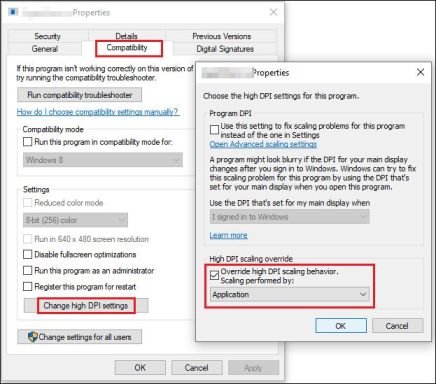
Now start the game normally and select your desired resolution from the game’s settings.
This method will allow Captain Tsubasa 2: World Fighters to apply your selected resolution even when you are using a monitor with a resolution higher than 1080p.